

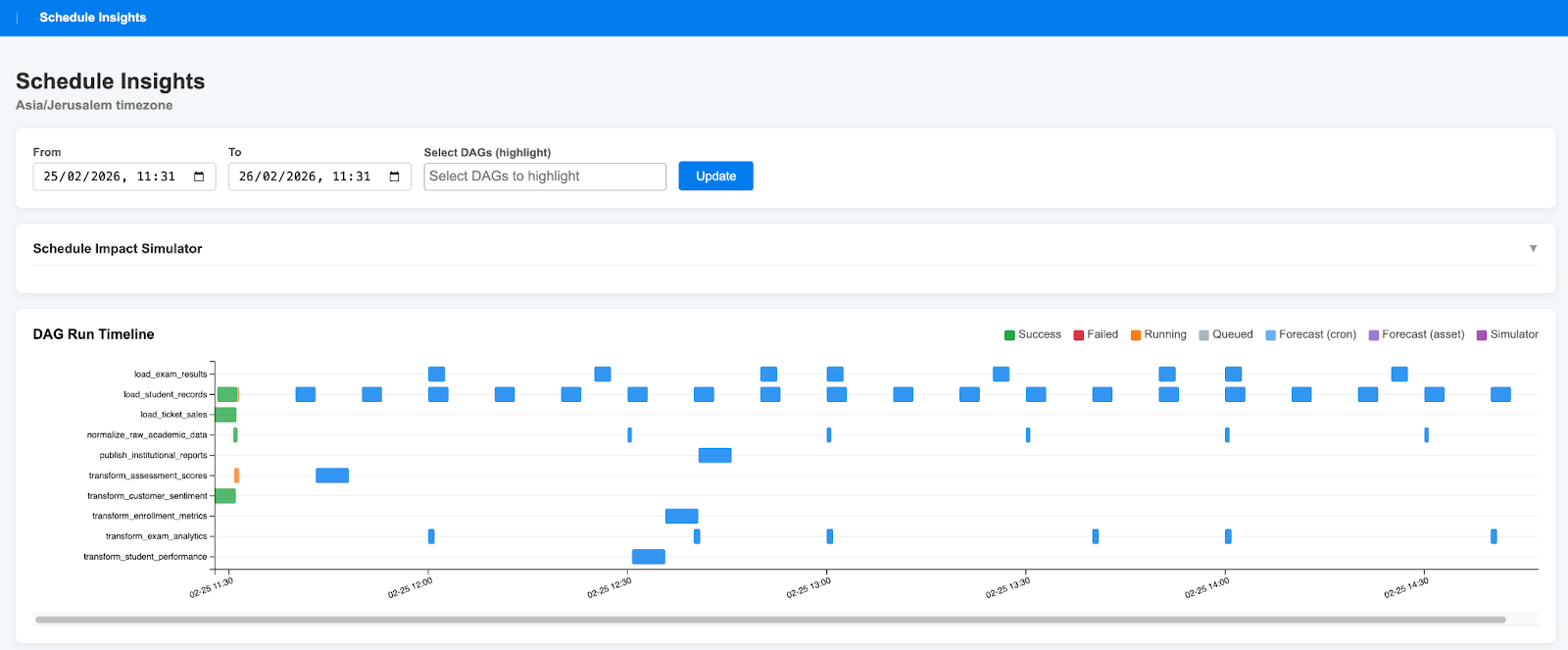
When we first introduced Airflow Schedule Insights, we told the story of Dr. Movie, a cinema chain struggling with a “scheduling black box.” They had DAGs that silently refused to run, resource bottlenecks from over-parallelization, and zero visibility into when their next asset-based trigger would actually fire.
That story helped explain the problem.
But with Airflow 3, we decided to evolve the example environment.
Instead of fictional cinema DAGs, we now ship example educational DAGs that mimic real academic data platform dependency patterns. These DAGs are not production pipelines — they simply replicate common educational orchestration structures and asset relationships so users can test complex scheduling scenarios in a realistic setting.
In other words:
They copy educational DAG dependency patterns — not institutional data.
This makes the demo environment more relatable for universities and training organizations, while remaining lightweight and safe to use as a sandbox.
And alongside that shift, Schedule Insights v0.2.0 is officially out — fully migrated, dependency-light, and optimized for Airflow 3.
pip install airflow-schedule-insights👉 GitHub: https://github.com/ponderedw/airflow-schedule-insights
What Changed in v0.2.0 (Airflow 3 Migration)
Under the hood, 22 files changed. If you’re a plugin developer, these are the silent Airflow 3 metadata changes you need to understand.
1️⃣ The Great Renaming: Datasets → Assets
Airflow 3 formalized the shift from “datasets” to “assets.”
Old:
task_outlet_dataset_reference
New:
task_outlet_asset_reference
If your plugin queries the metadata DB directly, this rename will break you.
2️⃣ Logic Flip: is_active → is_stale
Airflow 2:
DagModel.is_active == TrueAirflow 3:
DagModel.is_stale.is_(False)The column is gone. The logic is inverted. If you don’t update this filter, your visibility logic silently fails.
3️⃣ Asset Dependencies Are Trees, Not Lists
Airflow 3 introduces conditional asset expression9s with nested AND / OR logic.
Example:
(Asset_A AND (Asset_B OR Asset_C))This is no longer a flat dependency list.
We implemented a recursive evaluator that parses the new asset_expression JSON structure so Schedule Insights can still predict:
When a DAG will run
What it’s waiting on
Which branch of logic is currently blocking execution
Without this, “next run” predictions are simply wrong.
4️⃣ Better Performance, Fewer Dependencies
We removed pandas and numpy.
Run duration medians are now computed directly in SQL using percentile_cont via SQLAlchemy.
Result:
Faster installs
Lower memory usage
Cleaner dependency graph
Example Educational DAGs (Dependency Patterns Only)
For Airflow 3, the repository now includes an Academic Data Platform example DAG suite.
These DAGs simulate patterns such as:
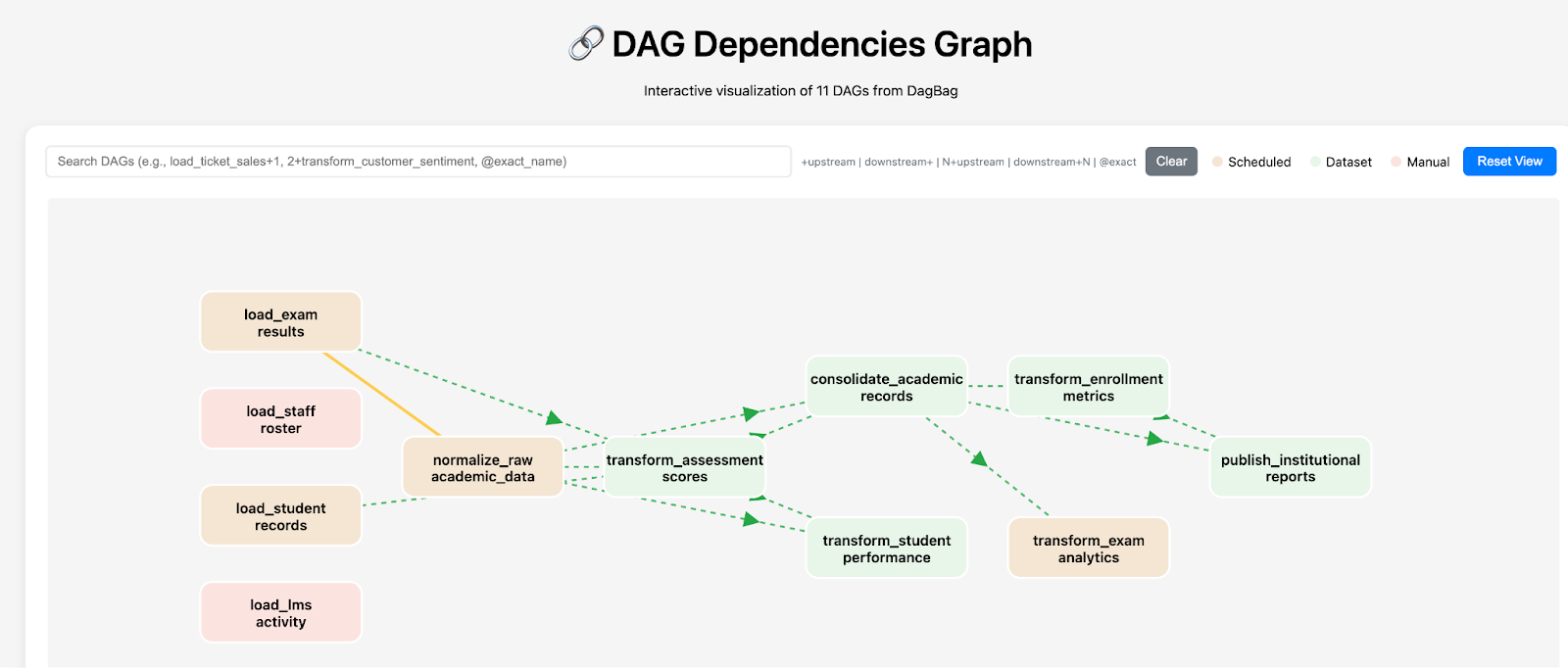
Ingestion → normalization → transformation → consolidation
Dataset/asset-triggered execution
Hybrid cron + asset scheduling
Conditional AND/OR asset logic
Reporting layers dependent on multiple upstream assets
They exist purely to demonstrate:
Complex asset expressions
Multi-layered DAG orchestration
Real-world dependency graphs
No real institutional integrations.
No sensitive data.
Just realistic dependency topology.
This makes Schedule Insights far more meaningful to demonstrate than the original cinema example, especially when working with Airflow 3’s asset trees.
Core Features (Now Tested on Complex Asset Graphs)
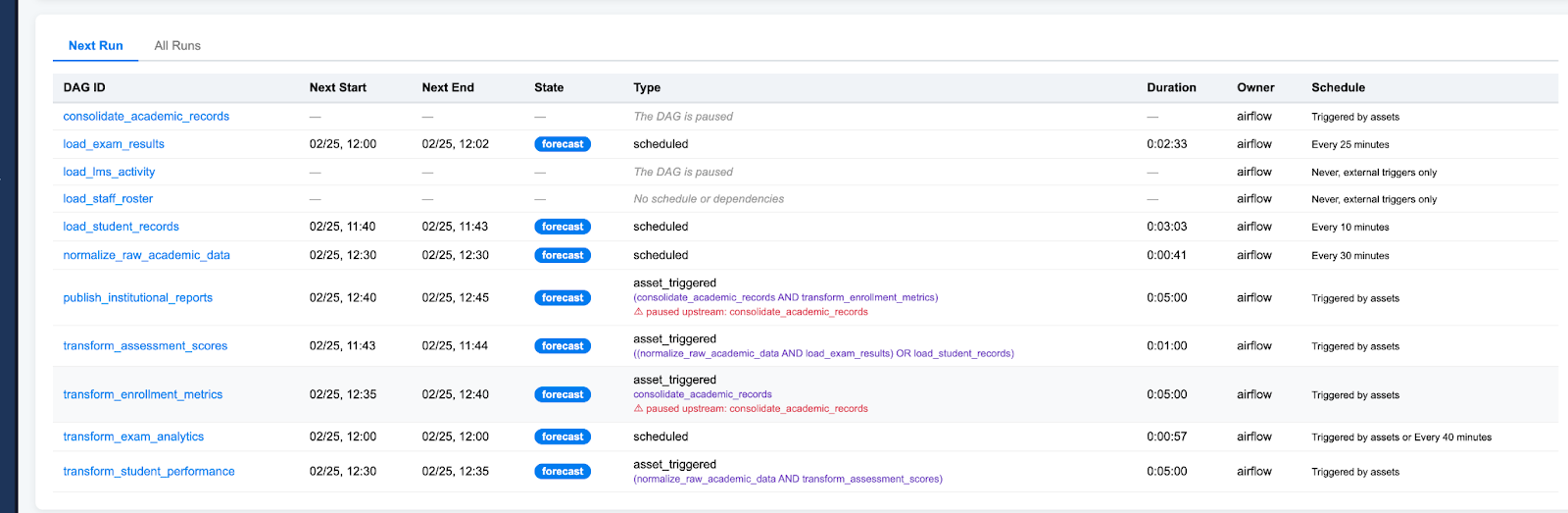
🛠 The Next Run Table — No More Silent Failures
Asset-driven DAGs often “don’t run” for subtle reasons:
Paused DAGs
Waiting on asset expressions
Hybrid cron + dataset logic
Unmet upstream conditions
The Next Run table explains exactly why:
“This DAG is paused and will not run.”
“No schedule or dependencies found.”
“Waiting for upstream Asset/DAG triggers.”
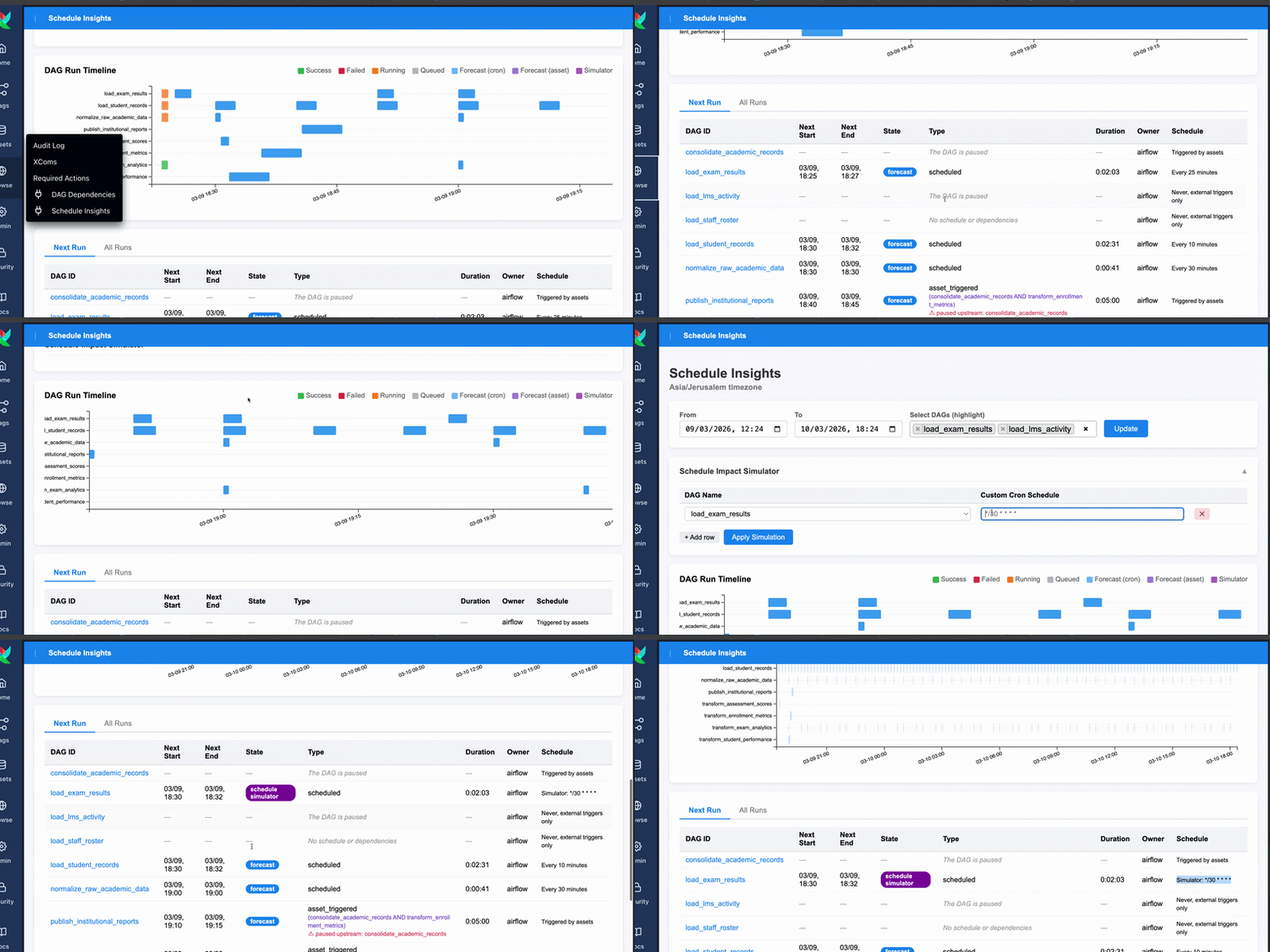
📊 The Schedule Impact Simulator
Want to change:
*/25 → */5Before committing?
Simulate it.
The UI highlights impacted future runs in purple and shows how the change propagates through downstream asset dependencies.
This is especially useful in complex multi-layer DAG graphs.
🕒 Timezone-Aware Gantt Charts
The plugin detects your local timezone and renders:
Historical runs
Predicted runs
Gantt charts
No more UTC mental math.
🔌 Programmatic Insights via API
We exposed the scheduling engine via FastAPI endpoints:
get_future_runs_json
get_next_future_run_json
Your internal tooling can now query predicted Airflow behavior programmatically.
Visualizing Structure with airflow-dag-dependencies
To complement Schedule Insights, you can use our companion plugin:
airflow-dag-dependencies
Schedule Insights tells you when a DAG will run.
airflow-dag-dependencies shows you how everything connects.
Together they provide:
Structural visibility (dependency graph)
Temporal visibility (future execution prediction)
Especially powerful with Airflow 3’s conditional asset trees.
Why This Matters at Scale
As more teams contribute DAGs to a shared Airflow environment — as is the case at Uncommon Schools, where multiple teams orchestrate data across a large network of schools — scheduling complexity compounds quickly. Each team adds their own timing requirements, and as run durations drift, overlap and resource contention become increasingly hard to spot from any single vantage point. Schedule Insights gives you a cross-team view — so you can see potential collisions before they become incidents. And when a DAG pile-up does occur, the historical run data lets you work backward and reconstruct what likely triggered the cascade.
Try It Today
Spin it up locally:
git clone https://github.com/ponderedw/airflow-schedule-insights
cd airflow-schedule-insights
docker compose -f local_airflow_3/docker-compose.yml up
Then navigate to:
Browse → Schedule Insights
You’ll see the plugin running against realistic educational dependency patterns — not fictional cinema workflows.
Airflow 3 made orchestration more powerful.
Schedule Insights makes it understandable.