

Introduction
dbt has become the backbone of modern analytics engineering, and one of its best features is CI: the ability to compare a developer branch with main, rebuild only the changed models in a temporary schema, and use production data from unchanged models. It’s an amazing way to catch issues before they hit production.
But what about incremental models and snapshots? Metrics like Grade Point Average whose day-by-day variations are captured in a dbt snapshot are then tracked and rendered in various contexts over time. This per-student metric is calculated in one environment (production) each day to ensure a clear source of truth. But for CI…that’s where things get tricky.
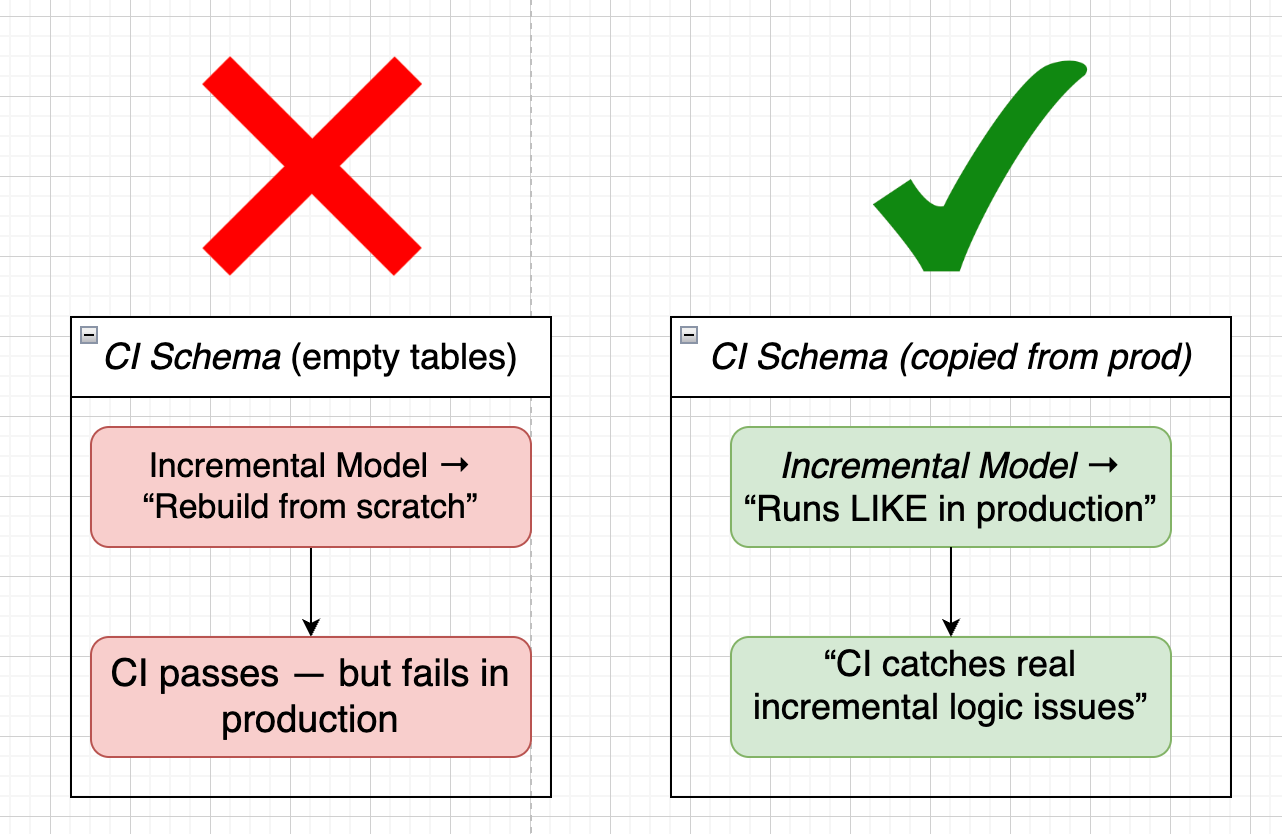
Both incremental models and snapshots have different logic for initial runs vs. upsert runs. In CI, everything is always built from scratch – so your CI may pass, only for the query to fail the moment it meets existing data or objects in production.
To solve this for Uncommon Schools, we built a tiny but powerful solution – and now we’re sharing it with everyone:
📦 dbt-incremental-ci (https://pypi.org/project/dbt-incremental-ci/)
Quickstart
Get up and running in under 5 minutes.
dbt-incremental-ci copies your production incremental models and snapshots into your CI schema so you can test against real production data, not empty tables.
Installation
pip install dbt-incremental-ciOption 1: Using a Local Manifest File
Use this approach if your production manifest.json is stored in S3, GCS, or available locally.
Step 1: Download your production manifest
# From S3
aws s3 cp s3://my-dbt-artifacts/prod/manifest.json ./prod_manifest.json

# From GCS

gsutil cp gs://my-dbt-artifacts/prod/manifest.json ./prod_manifest.json
Step 2: Copy production tables into your CI schema
dbt-incremental-ci \
  --prod-manifest-path ./prod_manifest.json \
  --dbt-project-dir . \
  --database-uri “postgresql://user:pass@host:5432/db” \
  --ci-schema “ci_pr_123” \
  --threads 4
Step 3: Run dbt with the copied production data
dbt build --select state:modified+ --defer --state ./prod_manifest.jsonStep 4: Run your tests
dbt test --select state:modified+ --defer --state ./prod_manifest.jsonYou’re now running incremental models and snapshots against actual production state—not empty CI tables.
Option 2: Using dbt Cloud
If you’re on dbt Cloud, you don’t need to download the manifest—the tool fetches it automatically from the API.
Step 1: Set your credentials
export DBT_CLOUD_API_TOKEN=”your_token”
export DBT_CLOUD_ACCOUNT_ID=”12345”
Step 2: Copy production tables into your CI schema
dbt-incremental-ci \
  --dbt-cloud-job-id “67890” \
  --dbt-project-dir . \
  --database-uri “$DATABASE_URI” \
  --ci-schema “ci_pr_123” \
  --threads 4
The tool will automatically:
Connect to the dbt Cloud API
Fetch the latest successful production run
Download the manifest
Copy the required tables
Step 3: Run dbt
dbt build --select state:modified+ --deferStep 4: Run your tests
dbt test --select state:modified+ --deferWhat Just Happened?
The tool:
Identified changed models using state:modified+
Filtered to incremental models and snapshots that already exist in production
Copied those production tables (with data!) into your CI schema
Preserved custom schemas (e.g., prod_marts → ci_pr_123_marts)
This ensures your CI pipeline behaves like a real incremental run—catching bugs that only appear when existing data is present.
Preview Before Running (Dry Run)
Want to see what will be copied without actually doing anything?
dbt-incremental-ci \
  --prod-manifest-path ./prod_manifest.json \
  --dbt-project-dir . \
  --database-uri “postgresql://user:pass@host:5432/db” \
  --ci-schema “ci_pr_123” \
  --dry-run \
  --verbose
This prints exactly which tables would be copied and the SQL that would run.
Final Thoughts
Incremental models and snapshots are some of the most powerful parts of dbt – but they’re also uniquely tricky to validate in CI. Full rebuilds simply don’t reflect how these models behave in production, which means some of the most painful bugs can slip past your pipeline undetected.
dbt-incremental-ci is our attempt to fix that gap. It’s a lightweight, practical solution that brings real production state into your CI runs so you can test incremental logic the way it actually runs in the real world.
But this isn’t the final word – far from it.
This is our first take at solving the problem, and we know the community will have ideas we haven’t thought of yet. If you have a better approach, want to improve this one, or see opportunities to make it smarter, faster, or more general – we’d love your help.
👉 PyPI: https://pypi.org/project/dbt-incremental-ci/
👉 GitHub: https://github.com/ponderedw/dbt-incremental-ci – issues, discussions, and PRs are all very welcome.