

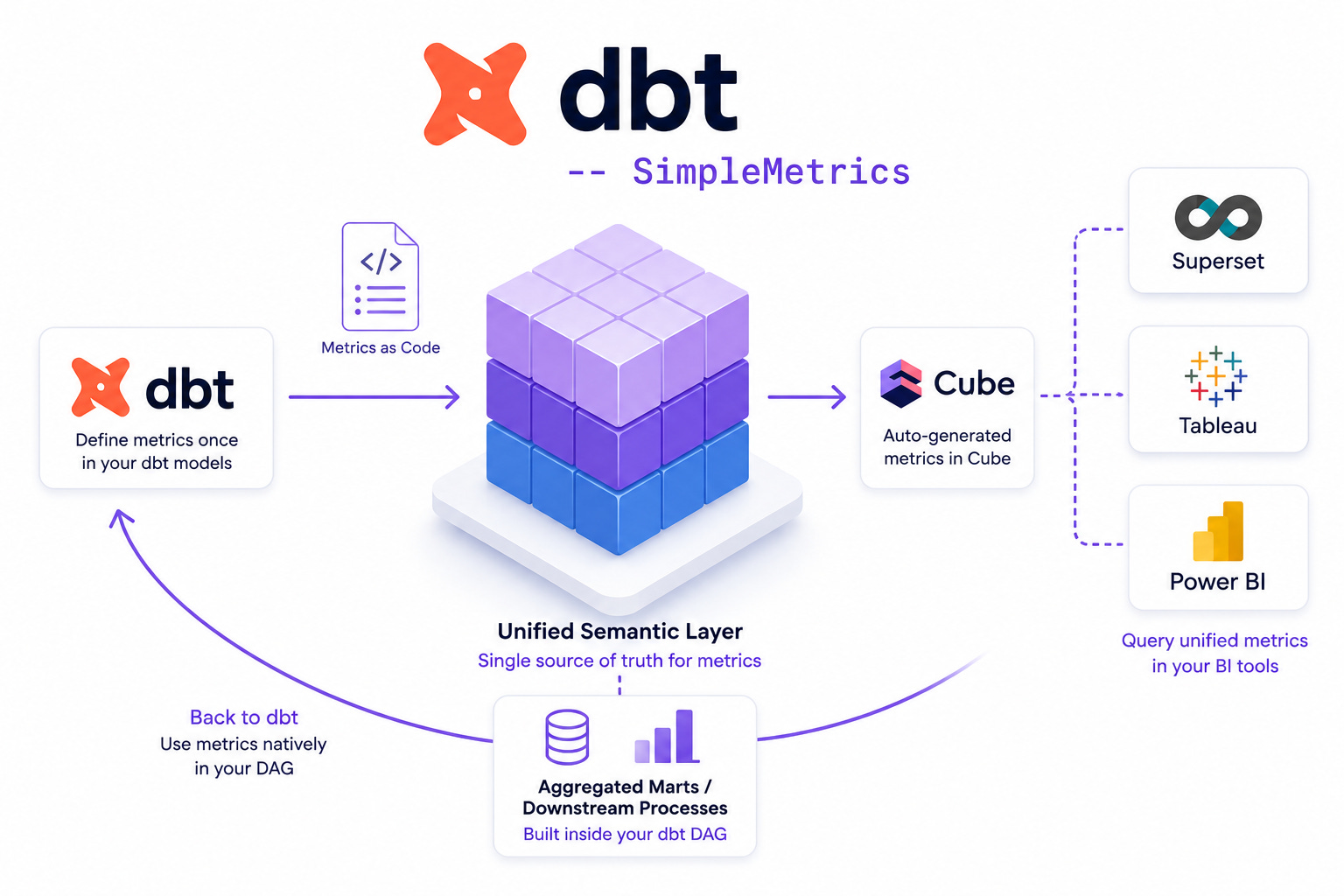
Rebuilding the same semantic layer over and over across different BI tools has always felt unnecessarily painful. Most dashboards still reach directly into databases, each with their own idea of what a “metric” is, so you end up maintaining the same logic in three or four places.
Late last year, out of frustration, we built dbt-to-cube to see whether dbt, Cube.js, and Superset could be wired together into a single automated flow. It worked: define metrics once in dbt, let a small tool translate them to Cube.js, and push them into your BI tool of choice—giving you a unified semantic layer across Superset, Tableau, or PowerBI without manual duplication.
But as we started relying heavily on this code-first workflow at Ponder Labs, a glaring logical gap emerged.
It’s great that downstream BI tools can query these unified metrics. But what about using those metrics inside dbt itself? If I wanted to build an aggregated reporting mart or feed a downstream process within my dbt pipeline, I still had to manually rewrite the SUM() or AVG() aggregations in my SQL, breaking the “define it once” rule. I wanted the metrics defined for Cube to be queryable natively in my dbt DAG.
That’s exactly why I built the next piece of the puzzle: dbt_simple_metrics.
The Solution: Metrics as Code Inside dbt
dbt_simple_metrics is a lightweight dbt package that lets you generate aggregated SQL from metric definitions sitting directly inside your model YAML files. Instead of navigating a heavy, standalone semantic layer setup, your columns and metrics live together, and you reuse them across your marts with a single macro call.
In our simplified format, we keep things incredibly close to the data. You define the dimensions under columns, and your measures under config.meta.metrics. It looks like this:
version: 2
models:
  - name: course_performance_summary
    columns:
      - name: course_name
      - name: academic_year
      - name: total_enrollments
    config:
      meta:
        metrics:
          total_course_enrollments:
            type: sum
            label: “Total Course Enrollments”
            sql: ${total_enrollments}
Now, instead of manually writing aggregations in your downstream models, you simply call the macro. The package validates the dimensions and metrics at compile time and generates the proper GROUP BY SQL:
{{ config(materialized=’table’) }}
{{ dbt_simple_metrics.metrics(
    ‘course_performance_summary’,
    [’course_name’, ‘academic_year’],
    [’total_course_enrollments’]
) }}
If you misspell a dimension or an unknown metric is requested, you get a clear compile-time error rather than a runtime failure.
The Elephant in the Room: MetricFlow
If you are immersed in the dbt ecosystem, you are likely wondering: Doesn’t dbt already have a Semantic Layer with MetricFlow?
It does. In fact, if you look at the semantic_models.yml file in the dbt_simple_metrics repository, you’ll see we actually included the MetricFlow definitions. We added them specifically so you can still see your metrics natively in dbt docs and the dbt Cloud catalog.
However, that file is an example of the legacy MetricFlow format. And honestly, it highlights exactly why we built our package. The old spec forces you to define a top-level semantic_models block entirely separate from your actual data models, with verbose, disconnected metrics configurations that look like this:
# The Legacy MetricFlow Format
metrics:
  - name: total_semester_headcount
    type: simple
    type_params:
      measure: total_unique_students
  - name: deans_list_rate
    type: ratio
    type_params:
      numerator: total_deans_list
      denominator: total_semester_headcount
It works for populating a catalog, but it feels detached from the code-first, model-centric workflow developers actually want.
Ahead of the Curve: Preparing for MetricFlow v2.0
Here is the good news: dbt Labs recognizes this friction.
With the upcoming release of dbt 1.12, they are stabilizing MetricFlow spec version 2.0. If you look at the differences, dbt is completely overhauling their approach to look... exactly like what we are already doing. They are abandoning the disconnected top-level wrappers and moving to embed semantic annotations (like semantic_model and simple metrics) directly under the models: block.
By adopting dbt_simple_metrics today, you aren’t fighting against the dbt ecosystem; you are skating to where the puck is going. You get the clean, embedded syntax that dbt is moving toward, with the immediate benefit of native dbt querying and automated syncing to Cube.js today.
And naturally, once dbt 1.12 becomes stable, we will be updating the package to ensure full, seamless compatibility with the final v2.0 spec.
Quickstart & Installation
To start using it in your dbt project and close the loop on your semantic layer, add the git repository and the specific revision to your packages.yml:
packages:
  - git: “https://github.com/ponderedw/dbt_simple_metrics.git”
    revision: v1.0.3
Run dbt deps, and you’re ready to start calling the macro in your marts.
At Ponder Labs, we are constantly pushing the boundaries of what code-first orchestration can do, and eliminating redundant metric definitions has been a massive win for our data engineering workflows.
Give the package a try, and let me know what you think on GitHub—PRs, feedback, and feature requests are always welcome!
Prepare thyself for the Semantic Wars … brought to you by your local, friendly, struggling SaaS vendor.