

LinkedIn is currently full of “dbt Core vs dbt Cloud” comparison tables — control on the left, speed on the right, pick your column based on team maturity. I left a comment on one of them recently and realized halfway through that I was fighting the format. So here’s the full version.
At Ponder, we build the Ponder DWE (Data Warehouse for Education) — data infrastructure that automates, cleans, and standardizes data from across instructional and operational platforms for K-12 schools and networks, shaped by our partnership with leaders in education reform such as Uncommon Schools. dbt sits at the center of that stack, and over the past few years we’ve run it in both flavors: Core, Cloud, and — this is the actual point of this article — both at once, at different layers.
Our main takeaway: the comparison table itself is the mistake.
A Quick Introduction: dbt, Core, and Cloud
For those outside the bubble: dbt is the de facto standard for the T in ELT. You write SQL models with Jinja templating, dbt compiles them into a dependency graph and runs them against your warehouse in the right order, with tests and documentation attached.
It comes in two forms. dbt Core is the open-source engine — a CLI you run yourself, wherever and however you want. dbt Cloud is the commercial platform around that engine: web IDE, job scheduler, CI, metadata catalog, all managed for you, all billed accordingly.
Same models run on both. Keep that fact in mind — it’s the load-bearing fact of this whole article.
The Framing Problem
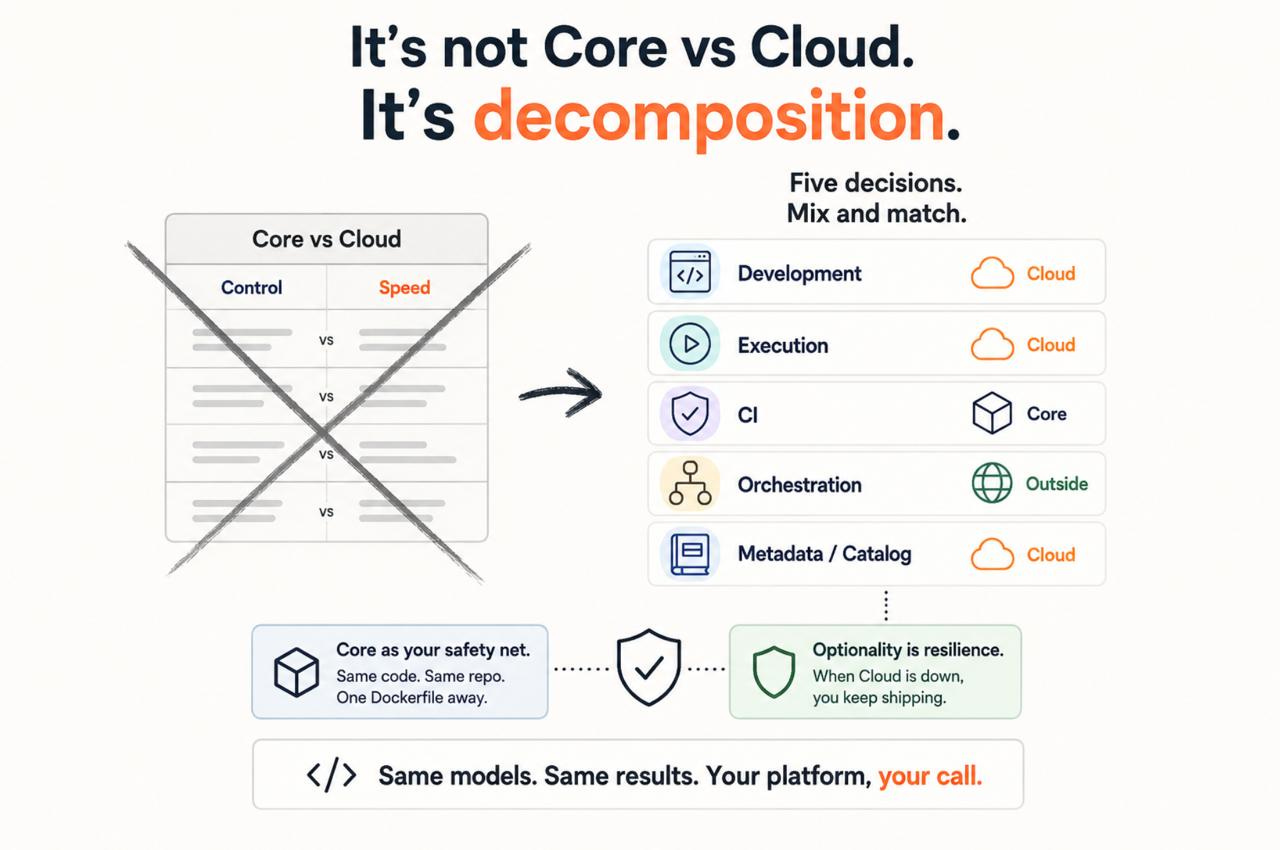
“Core or Cloud” assumes dbt is one decision. It isn’t. It’s at least five separate decisions — development environment, execution, CI, orchestration, metadata — and nothing forces you to answer them all the same way. The vendors’ framing collapses these layers into a single either/or because that’s how you sell a platform. Your actual job is to decompose them back.
Here’s how that decomposition went for us in practice.
Development: Cloud Won, for a Mundane Reason
We started on Core, like most teams that come up through the engineering side. Then we moved development to Cloud, and the reason was mundane: the IDE. Not the scheduler, not the enterprise security slide — the IDE. Autocomplete over your actual project, instant compile previews, analysts contributing without a local Python environment fight.
Whatever your opinion on web IDEs, the onboarding difference is real. In an education data context, where the people who best understand the data are not always the people most comfortable with a terminal, that difference compounds. Pretending otherwise is how “team maturity” becomes a euphemism for “we enjoy gatekeeping.”
That said, the Cloud IDE may not be the final word here. We’ve been standardizing development environments across the stack with Coder — reproducible, isolated workspaces that spin up in minutes (we wrote about the Airflow version here). A dbt workspace built the same way could give us the onboarding benefits without the platform dependency — we’re evaluating exactly that, and will tell you about this decision shortly. Maybe that next solution is what we picked for the Ponder DWE package. Stay tuned.
Execution: Split Environments Are Worse Than Either Environment
Moving development to Cloud while running production on Core taught us the first lesson quickly: two runtimes, two behaviors, one permanent source of drift. This is the class of bug where a model works in the IDE and fails at 3 AM for reasons neither set of logs will explain.
So execution moved to Cloud too. Jobs run there now. One runtime, one behavior. Fine.
But that’s where the migration stopped — and the stopping points are the actual content of this article.
CI: Stayed on Core, Deliberately
Cloud’s CI is convenient precisely because it’s opinionated — and opinionated tools are great right until your workflow disagrees with the opinion. Ours does: selective builds based on what actually changed, custom data quality gates, environment-specific checks before merge.
A concrete example: we’ve written before about a setup where dbt handles both ingestion and transformation — Trino-based ingestion in one project, warehouse transformations in another, wired together as packages, with CI that tests modified models across both using defer state. You can read the full walkthrough here: Trino + dbt: Simplifying ELT with Pure SQL.
The relevant constraint: dbt can’t run two adapters in a single project. So CI has to be elastic — two projects, two profiles, ordered execution, shared state between them. In Core, that’s a shell script. In Cloud, that shape simply doesn’t exist. And bending a managed product against its own opinions is the most expensive kind of engineering there is.
One related warning from the same story: custom Core solutions can surface odd behavior when they meet Cloud, because Cloud implements some things slightly differently. After we integrated that Trino setup, the Cloud IDE started demanding dbt deps on every refresh — press F5, rerun deps, something strange in how it handles local packages. Fairness requires the next sentence, though: dbt Cloud support actually works. Real humans, real answers — they helped us through exactly this kind of problem, which is not something we can say about every SaaS vendor in the data stack.
Orchestration: Keep It Outside
Real pipelines don’t start and end with dbt. There’s ingestion upstream, reporting and reverse ETL downstream, sensors, retries that need context about what failed and why. Cloud’s scheduler knows about dbt jobs; your orchestrator knows about your platform.
Triggering Cloud jobs from Airflow via API is one operator. Wiring non-dbt dependencies around Cloud’s scheduler is a distributed system built out of webhooks and hope. We kept orchestration in Airflow and let dbt Cloud be an execution layer, not the brain.
Two Footnotes That Never Make the Comparison Tables
The catalog. Column-level lineage out of the box is quietly one of the strongest arguments for Cloud — the feature nobody asks about during evaluation and everybody uses six months in. When a district asks why a number on a dashboard changed, tracing a column from the report back through every transformation to the source system is not a nice-to-have.
Networking. SSH tunnels aren’t supported for all adapters. We couldn’t connect a private Trino cluster a few months ago — maybe it’s fixed by now, but check your networking story before you commit. “Enterprise-grade integrations” and “can reach your database” are different claims.
The Fine Print: Keep a dbt Core Escape Hatch
Even if you go all-in on Cloud, keep a backup image with dbt Core and your run logic. Remember the load-bearing fact — Core and Cloud run the same code from the same repo, which means a container with dbt Core is a disaster recovery plan that costs you one Dockerfile.
When dbt Cloud is down, “fully managed” means fully waiting. When it’s down and you have that image, it means running dbt build from a container until it’s back. The whole option costs nothing. Not having it costs an incident review.
Conclusion: It’s Not Maturity. It’s Decomposition.
So where did we land at Ponder? Development and execution in Cloud. CI in Core. Orchestration outside both, in Airflow. Catalog from Cloud, disaster recovery from Core.
That’s not indecision — that’s the answer. The maturity question was never “which tool can your team handle.” It’s whether you know which layers of your platform you actually need to own, and have the discipline to rent the rest.
The comparison tables get one thing right: it’s not about the tool. They just stop one step too early. It’s not about maturity either. It’s about decomposition.