

We’ve written a handful of posts about Trino already -- ingesting raw files into a lakehouse in Hive Data Ingestion, Simplified, moving Uncommon Schools’ student data over in PowerSchool to Lakehouse, keeping dbt lineage honest so dashboards don’t quietly break in Preventing Broken Dashboards, and running ELT in pure SQL in Trino + dbt: Simplifying ELT with Pure SQL. Trino solved a real problem for us -- one query engine across every catalog we own, instead of picking between “fast” and “everything in one place.”
It also handed us back two problems we thought we’d already solved. Before Trino, database credentials lived in Airflow’s backend -- AWS Secrets Manager, in our case -- and a hook resolved the current value on every task run: rotate a password and the change was live on the next run, no DAG edits, no restart. Trino’s catalog config doesn’t work that way -- a credential sits in a properties file loaded once at startup, so rotating one meant editing a Helm value and running terraform apply by hand, exactly the manual workflow we thought we’d stopped doing. That’s the first problem, and it gets its own fix later in this post -- the Dynamic Catalog System, which gets credential rotation back to “rotate and forget” without anyone touching Terraform.
The second problem has nothing to do with restarts and everything to do with what the access rules can actually express. Trino’s built-in access control (file-based, GRANT-based, system-level, doesn’t matter which) gives you table-and-catalog granularity and nothing finer: no row or column filtering, no way to reuse a rule anywhere else it’s needed (a BI tool, an internal API) and no structured decision log to check who was allowed to see what, and why. Rotating that ACL instantly wouldn’t have helped — the rules themselves were too blunt for what we actually needed to express. That’s what Open Policy Agent fixes, and it’s the bulk of what follows.
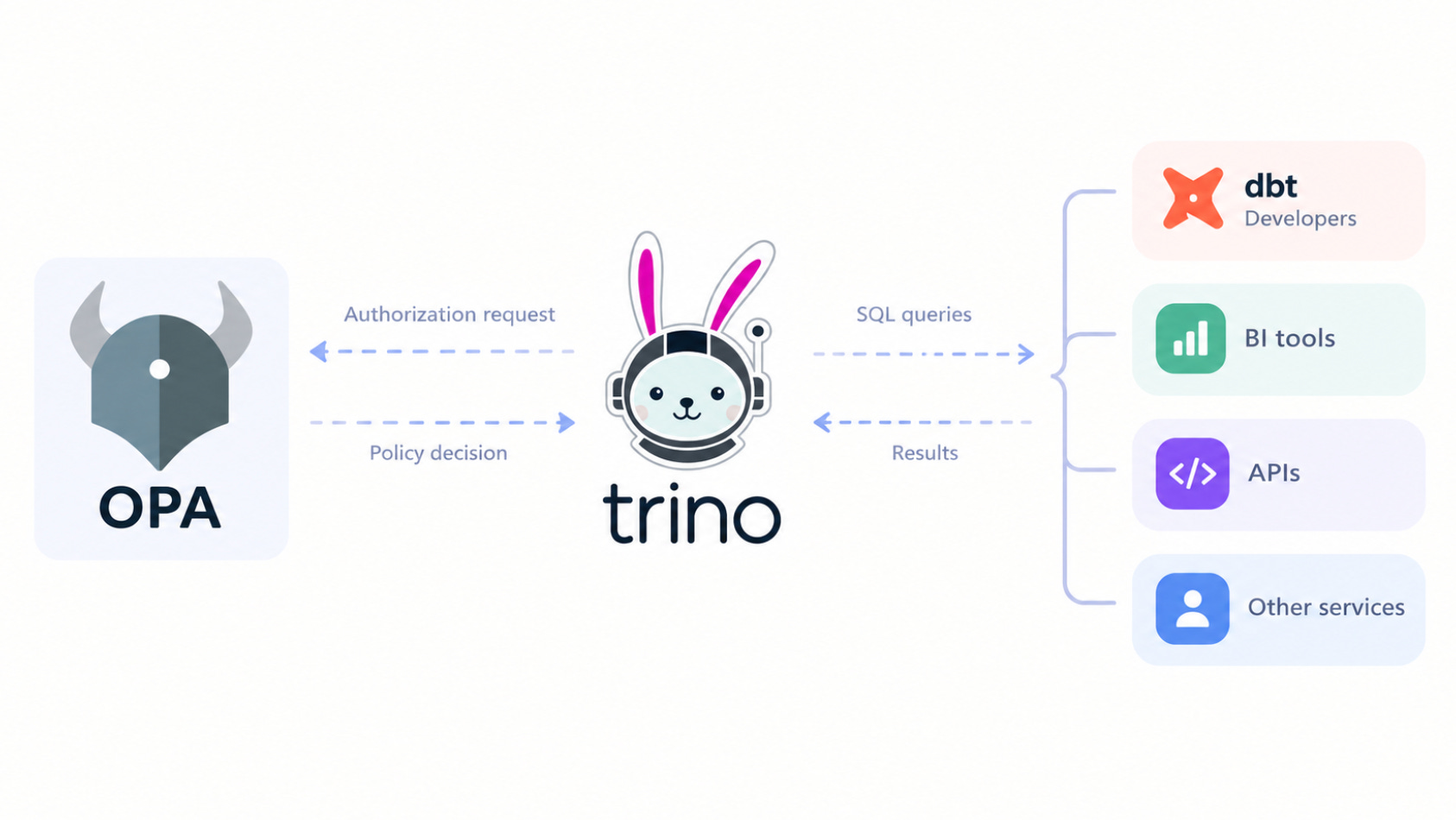
OPA is a general-purpose policy engine that pulls authorization out of application code entirely — instead of scattering if user == "admin" checks through a codebase, you write the rules once in Rego, a declarative policy language, and any service asks OPA over a simple HTTP API. It doesn’t care what’s asking — Trino, a BI tool, an internal API can all point at the same OPA instance and the same policies.
Trino ships a built-in OPA access-control plugin since version 435: every authorization decision — can this user run this query, see this schema, select these columns — becomes an HTTP call to OPA instead of a lookup in a static file. That’s how we manage Trino access control for Uncommon Schools today, and as a bonus, the policy lives outside Trino’s own config, so it hot-reloads independently — change a rule, save the file, live in about a second, no coordinator restart. Below is the full setup — how the plugin talks to OPA, how to write and test policies in Rego, and how to run all of it from a local Docker Compose stack up through Kubernetes and Terraform.
Start The Stack
The whole setup (Trino, OPA, the example policy, four pre-configured catalogs) is in ponderedw/trino-opa. Clone it and bring the stack up with Docker Compose:
git clone https://github.com/ponderedw/trino-opa.git
cd trino-opa
docker compose up -d
That starts two containers: OPA on
http://localhost:8181
, watching the ./opa/ directory for policy changes, and Trino on
http://localhost:8080
, already configured to call OPA for every authorization decision — nothing to wire up by hand.
Confirm OPA came up clean:
curl http://localhost:8181/health
# {"healthy": true}
Then connect with the Trino CLI (or any JDBC client):
trino --server http://localhost:8080 --user adminAt that point you’re talking to a Trino cluster that’s already asking OPA “is this allowed?” on every query — as admin you’ll see all four catalogs; switch --user to read_only_user, one of the BI developers (alice, bob), or one of the dbt developers (charlie, dave), and SHOW CATALOGS returns a different list each time, because that’s the example policy in opa/trino.rego deciding what each identity gets to see.
How the policy works
The file lives at opa/trino.rego, and everything in it is one OPA rule set under the trino package — the name has to match, because Trino calls /v1/data/trino/allow (and /v1/data/trino/batch), and OPA routes that URL straight to a package with the same name.
package trino

import future.keywords.if
import future.keywords.in

default allow := false
That last line is the whole security model in one statement: every request is denied unless some rule below explicitly says otherwise. Rego rules with the same name (allow) aren’t evaluated top to bottom like an if/else chain — they’re OR’d. If any allow rule’s body evaluates to true for a given request, the user gets in. That’s why the rest of the file reads as a flat list of “grant if...” blocks rather than nested conditionals.
Admin, and the shared read-operations set
allow if {
	input.context.identity.user == "admin"
}
admin gets a one-line rule with no conditions beyond identity — full access, no exceptions. Right below it, _read_ops is just a named set of Trino operation strings (SelectFromColumns, ShowTables, ExecuteQuery, and so on). It doesn’t grant anything by itself; it’s a helper the other roles reference so “is this a read?” isn’t retyped as a giant in {...} block four times over.
read_only_user — school staff reading SIS/MIS and assessment data
_read_only_catalogs := {"powerschool", "illuminate"}

allow if {
	input.context.identity.user == "read_only_user"
	input.action.operation in _read_ops
	input.action.resource.table.catalogName in _read_only_catalogs
}
All three conditions inside one allow block are AND’d — this rule only fires if the user is read_only_user, the operation is a read, and the table’s catalog is powerschool or illuminate. Try to INSERT into either, or read from bi_prod, and this rule simply doesn’t match and since nothing else matches either, default allow := false wins.
The second read_only_user rule handles a real gotcha: operations like SHOW SCHEMAS fire before Trino has resolved a specific table, so input.action.resource.table doesn’t exist yet on that request. Without a rule that explicitly allows browsing when not input.action.resource.table, read_only_user would get denied before they ever reach the point of picking a table to read from.
bi_developer and dbt_developer — same shape, different blast radius
alice and bob (_bi_developers) and charlie and dave (_dbt_developers) follow an identical pattern to read_only_user for reads — powerschool and illuminate for both groups, plus bi_prod for the BI developers — with one addition: scoped write access.
allow if {
	input.context.identity.user in _bi_developers
	input.action.resource.table.catalogName == "bi_prod"
	startswith(input.action.resource.table.schemaName, "dev_")
}
Anything whose schema name starts with dev_ inside bi_prod is fair game for full read/write — dbt_developer gets the equivalent for sandbox. That startswith check is doing real work: adding a new dev schema for a new project needs zero policy changes, as long as the team keeps naming schemas dev_whatever. Notice each group actually needs two versions of this rule — one checking resource.table.schemaName, one checking resource.schema.schemaName — because an operation like CREATE SCHEMA resolves a schema resource, not a table resource, and Rego won’t match a field that isn’t there.
The batch rules — the same logic, shaped for lists
batch contains i if {
	input.context.identity.user == "read_only_user"
	resource := input.action.filterResources[i]
	resource.table.catalogName in _read_only_catalogs
}
This is a set comprehension, not a boolean — batch collects every index i for which the body holds true, across the whole input.action.filterResources array Trino sends. When someone runs SHOW TABLES, Trino doesn’t ask “can they see table X” one table at a time; it sends the whole candidate list once to /v1/data/trino/batch and OPA hands back the set of indices that pass. That’s why every role above shows up twice in the file — once as allow rules for single-resource decisions like SELECT, once as batch rules for filtering operations like SHOW SCHEMAS or SHOW TABLES — and why the batch version has to repeat the catalog/schema/table variants for the same reason the write rules did: filterResources[i] can be a catalog, a schema, or a table shape depending on what’s being listed.
It’s worth seeing the failure mode this whole structure is built around, and a GUI client makes it obvious. Set up a new Trino connection in DBeaver pointed at localhost:8080, and instead of admin or one of the users the policy actually knows about (read_only_user, alice, bob, charlie, dave), put hacker in as the username.
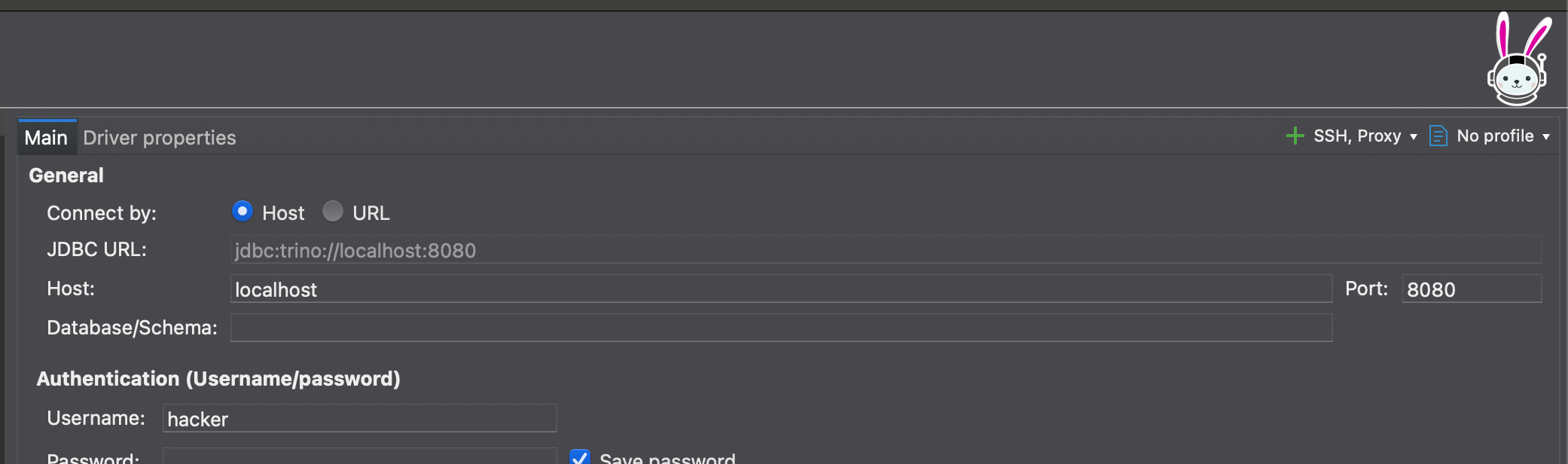
Open a SQL editor against that connection and run:
SELECT * FROM powerschool.public.students LIMIT 10;
DBeaver comes back with the query rejected outright: Access Denied: Cannot execute query. Nothing in the file mentions hacker — not admin, not read_only_user, not _bi_developers, not _dbt_developers. Every allow rule’s body fails to match, default allow := false is the only thing left standing, and OPA returns {"result": false} before Trino lets the query anywhere near powerschool. No “deny hacker” rule had to exist for that — the absence of a matching grant is the denial, which is the whole point of writing the policy as explicit allows instead of a blocklist: a name nobody added to any group is locked out by default, not by oversight.
Terraform — one apply for the whole stack
terraform/ deploys everything as a single unit: the trino namespace, OPA (ConfigMap, Deployment, Service, all in opa.tf), and Trino itself via the official Helm chart (trino.tf, which renders helm-values.yml through Terraform’s templatefile()). variables.tf holds every tunable (sizing, the bcrypt password hashes, the internal-communication shared secret) so a first deploy is really just filling in terraform.tfvars and running:
terraform init
terraform apply
Terraform creates the namespace, stands up OPA, then deploys Trino via Helm only after OPA’s Service exists — so the coordinator never comes up pointed at a hostname that isn’t resolvable yet.
The part worth dwelling on is how a policy change actually propagates here, because it isn’t what you’d assume. Editing opa/trino.rego and running terraform apply again does not mean OPA reads the new file live — Kubernetes mounts ConfigMap data through a ..data/ symlink, and OPA’s --watch mode (the thing that makes hot reload work locally) follows the symlink target directly, which can mean seeing duplicate package definitions mid-update. So in Kubernetes, --watch is off entirely, and the mechanism is different: opa.tf computes sha256(jsonencode(...)) of the ConfigMap’s content and writes it as a pod annotation. Change the policy, the hash changes, and Kubernetes sees that as a different pod spec — which triggers a rolling restart on its own, no kubectl rollout restart needed. One new OPA pod passes its readiness probe before the old one is torn down, so Trino is never left without something to call. The mechanism is a restart, not a live watch, but the effect for anyone running queries is identical to the Docker Compose case: edit the file, terraform apply, and the new rules are live with zero query-serving downtime.
CI — validate everywhere, deploy only from main
Both .github/workflows/ci.yml and .gitlab-ci.yml follow the same two-stage shape, and neither pipeline reaches for prebuilt CI actions or specialized images — both stages just run alpine:latest and install exactly what they need from official install scripts.
validate -> deploy (main branch only)validate runs on every push and every pull/merge request:
tofu fmt -check -recursive terraform/
tofu -chdir=terraform init -backend=false
tofu -chdir=terraform validate
State itself lives in S3, not on anyone’s laptop or in CI — main.tf points the backend at a bucket (key trino/terraform.tfstate, encrypt = true), so every apply, whether it’s run from CI or someone’s machine during a migration, reads and locks the same state file instead of each place keeping its own idea of what’s deployed. That’s exactly what -backend=false in the validate stage is opting out of: it skips connecting to S3 (and the AWS credentials that would require) entirely, because validate only needs to check syntax and cross-references, not touch real state. It means the stage runs on any runner, fork PRs included, without anyone handing AWS keys to untrusted CI jobs. This stage is pure syntax, type, and policy-logic checking.
deploy only runs on pushes to main, and only after validate passes. It’s the one stage that installs the full chain — bash curl unzip python3 py3-pip openssl via apk, awscli via pip, OpenTofu / kubectl v1.28.4 / Helm via their install scripts — adds the Trino Helm repo and pulls the chart, authenticates against AWS from CI secrets, points kubectl and Helm at the cluster with aws eks update-kubeconfig, and finally runs tofu init -upgrade && tofu apply -auto-approve against the same terraform/ directory the validate stage only checked the syntax of. This time init connects to S3 for real, takes the lock, and apply rolls out both OPA and Trino together, including triggering the configmap-hash-driven OPA restart if the policy changed in that commit. The credentials it needs — AWS_ACCESS_KEY_ID, AWS_SECRET_ACCESS_KEY, AWS_REGION, EKS_CLUSTER_NAME — live in GitHub/GitLab’s secret store, not the repo, and the GitLab deploy job is pinned to a runner via tags: [docker] (swap that for whatever your own runner is tagged). Net effect: the only path a policy change takes to reach production is a merge to main, never a kubectl apply run by hand from someone’s laptop.
The Dynamic Catalog System — rotating credentials without touching Terraform
Everything above solves who’s allowed to run a query. It doesn’t solve what happens when the password Trino uses to connect to powerschool itself needs to change — and until this piece existed, the answer was still “edit a Helm value and run terraform apply,” which is exactly the workflow this whole post has been trying to get away from.
Here’s what actually happens now, end to end, the moment someone rotates a catalog password in AWS Secrets Manager:
An ExternalSecret resource is already watching that key, managed by the External Secrets Operator. Within about 60 seconds of the rotation, ESO pulls the new value out of Secrets Manager and writes it into the Kubernetes Secret it’s mapped to. Nobody ran terraform apply, nobody touched Helm — the new password simply exists in the cluster now, on ESO’s own schedule.
A refresher sidecar running alongside Trino is polling that Secret, and the catalog templates, every 30 seconds. It sees the value changed but it doesn’t restart anything on the spot. It checks Trino’s own REST API first, using a separate cleartext admin credential it holds for exactly this purpose, to see whether any queries are currently running, and it holds off until the cluster is idle.
Once it’s safe, the sidecar patches the Trino Deployment’s restartedAt annotation. Nothing about the container image or config actually changed as far as Kubernetes is concerned, but a changed annotation is still a changed pod spec, so it triggers a normal rolling restart — one new pod up and passing readiness before the old one goes away, the same trick the OPA ConfigMap hash uses.
The new pod’s catalog-init container runs before Trino itself starts: it reads the now-updated credential Secret, takes the .properties.tmpl template files (just the real property file with placeholders like {my_catalog_password} where the secret goes), renders the finished .properties files into a shared volume, and only then does Trino boot and read its catalog config from that rendered file.
Someone rotates a password in Secrets Manager, and somewhere between one and a few minutes later (however long it takes the cluster to go idle) Trino is running with the new credential. No PR, no terraform apply, no one remembering to redeploy, no window where a stale password quietly keeps working because nobody restarted anything. That’s the exact experience we had with Airflow and Secrets Manager back at the start of this post (rotate and forget) just rebuilt for a system that doesn’t do that on its own by default.
Closing thoughts
Worth being honest about one edge before you go all in on the “no restart” pitch: Trino caches some authorization decisions on its own side. If you’re actively iterating on opa/trino.rego and a change doesn’t seem to take effect, it’s usually not OPA — it’s Trino serving a cached answer from a second ago. Wait a few seconds, or restart the Trino session you’re testing from, and it clears. (There’s a ?decision_id=$(uuid) trick to bypass it entirely during development, but it’s not something you’d want running in production.) Hot reload solves the actual problem — policy changes reaching OPA without touching either service — it just doesn’t mean every single query sees the new rule the instant you hit save.
That caveat aside, this is the setup we run for Uncommon Schools today: one Rego file defining who gets to touch powerschool, illuminate, bi_prod, and sandbox, versioned in git, checked by CI before it ships, and rolled out to production by the same terraform apply that manages the rest of the Trino cluster — and the credentials those catalogs connect with now rotate on their own, through Secrets Manager and the dynamic catalog system, without anyone touching that terraform apply at all. Nobody edits a properties file and bounces a coordinator to change who can see what, and nobody edits a Helm value and bounces a coordinator to change what a catalog connects with, either. Both are just infrastructure now — reviewable, testable, and safe to change, the same as everything else we ship. That’s the parity we were actually after: not that Trino works like Airflow did, but that neither one makes you choose between an easy rotation and a safe one.
Full repo: github.com/ponderedw/trino-opa