

A PHP alert, from a data team
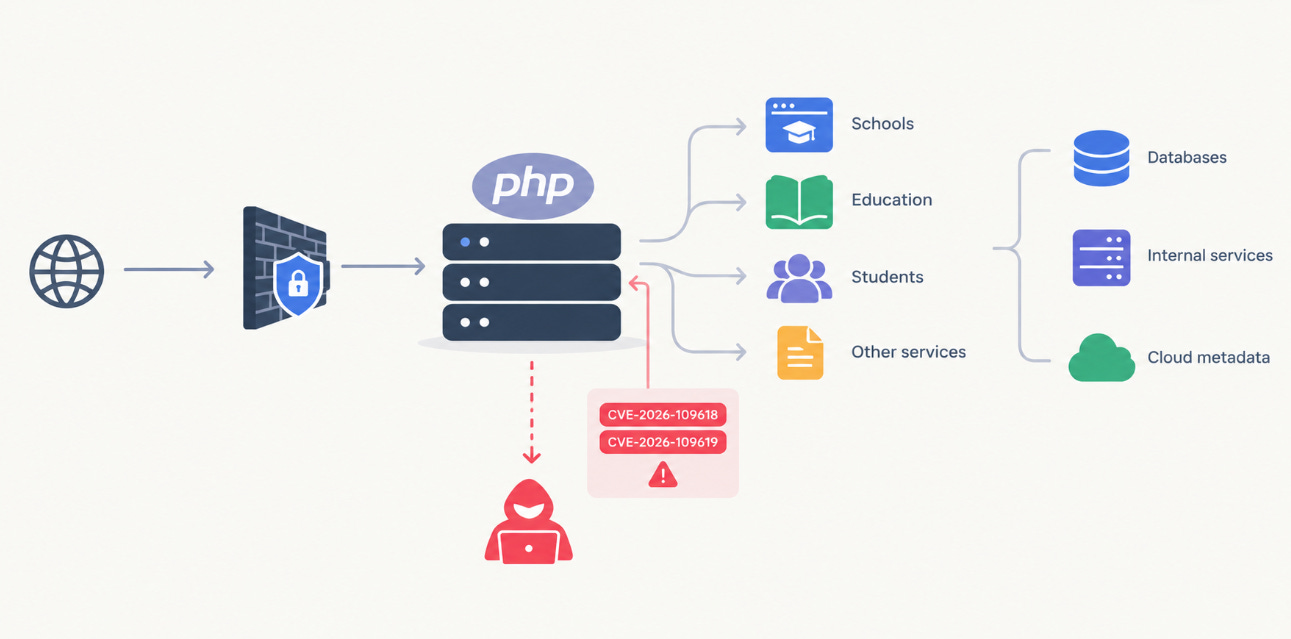
On October 21, 2026, the UK’s National Cyber Security Centre published an alert about two critical PHP vulnerabilities, CVE-2026-109618 and CVE-2026-109619. Under certain conditions, they allow unauthenticated remote code execution on any web server running PHP. Every version is affected, not just old ones.
If you haven’t run into the NCSC before: it’s the UK government’s technical authority on cyber security. It sits under GCHQ, the UK’s signals intelligence agency, and was set up in 2016 as the single point of contact for cyber incidents in the UK. Most UK organisations treat its guidance as the baseline, and it doesn’t issue an “act immediately” alert about a single language runtime very often.
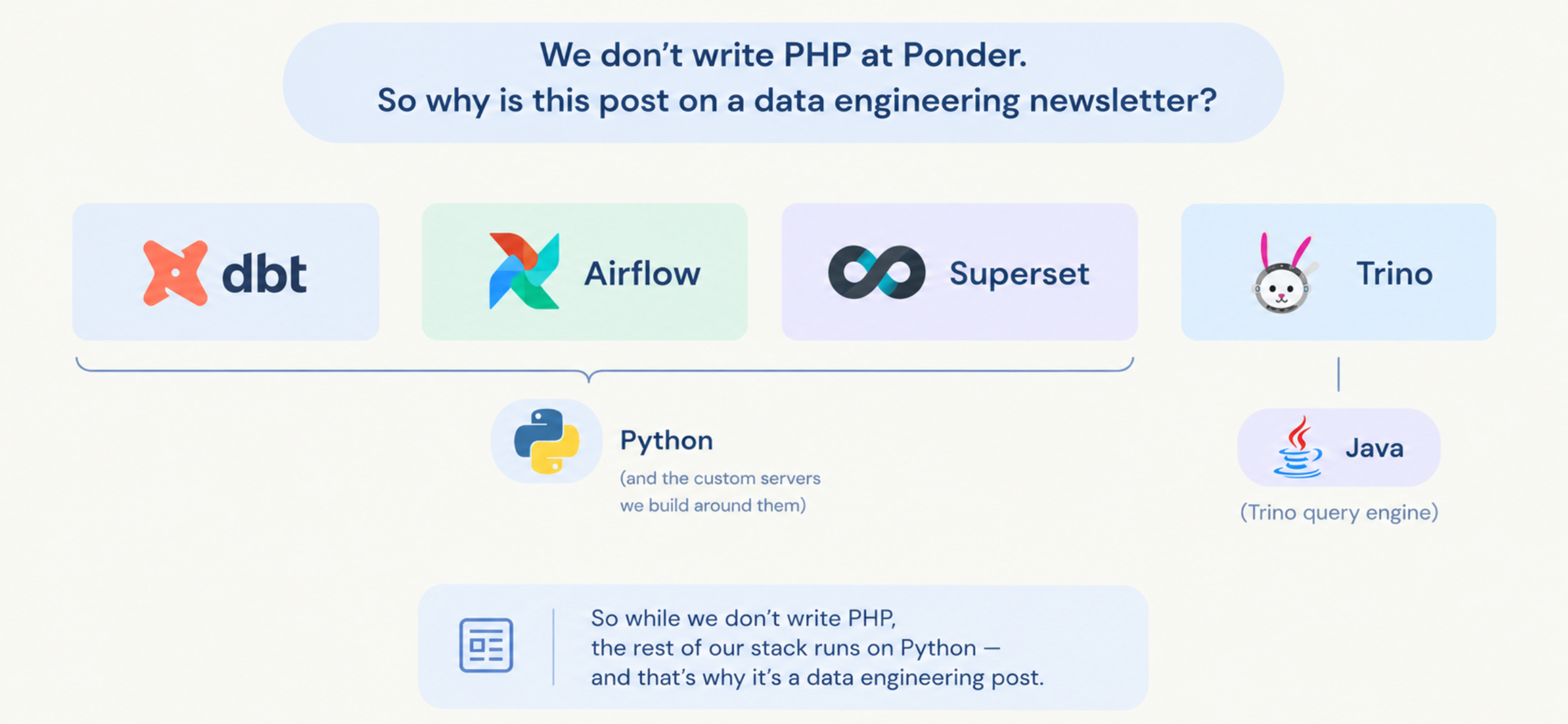
We don’t write PHP at Ponder. Our stack is dbt, Trino, Airflow and Superset. Trino is a Java query engine; dbt, Airflow, Superset and the custom servers we build around them are Python. So why is this post on a data engineering newsletter?
Because this alert is a clean, very current example of something we’re designing the Ponder DWE around as we build it: for a platform that holds student data, the login page is not the security boundary. The network is. Here’s the bug, why it matters beyond PHP, and how we think about keeping data services private.
What the bug does
What PHP is. PHP is one of the oldest and most widely used languages for building websites. When you open a page on a PHP site, the web server hands your request to PHP. PHP runs a script that reads from the database, builds the page, and sends it back to your browser. WordPress, Moodle and phpMyAdmin are all written in PHP.
How it handles requests. Think of a PHP worker as a hotel room. Each request is a guest: it checks in, uses the room, checks out, and housekeeping resets the room before the next guest arrives. Building a new room for every guest would be far too slow, so PHP reuses the same room -- the same worker process -- thousands of times, and relies on housekeeping, its cleanup code, to wipe every trace of the previous guest. PHP calls this “shared-nothing”: each request should find the room exactly as if nobody had been there before.
There’s one more rule. Every request gets a memory budget, set by memory_limit. If a request goes over it, PHP stops that request on the spot, like a fire alarm that clears the room immediately, whatever the guest was in the middle of.
How it fails now. Both new CVEs are housekeeping failures:
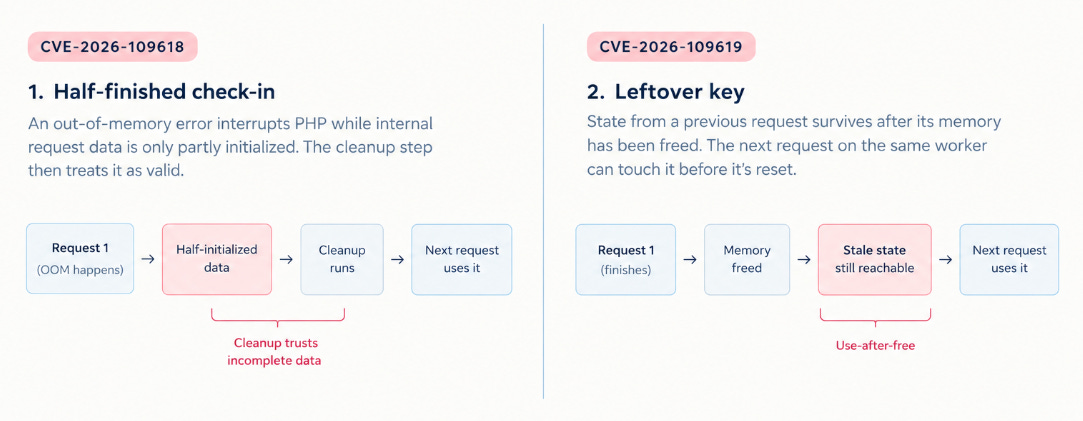
CVE-2026-109618 -- the half-finished check-in. If the alarm goes off while a guest is still halfway through checking in, housekeeping later picks up the half-filled check-in form and treats it as complete. Technically: an out-of-memory condition interrupts PHP while internal request data is only partly set up, and the cleanup step trusts it anyway.
CVE-2026-109619 -- the leftover key. Something from the previous guest survives the cleaning: a key to memory that has already been handed back. The next guest in the same room can pick it up and use it before housekeeping notices. Technically: request state outlives the memory behind it, and the next request on the same worker can touch it before it’s reset.
Why that’s dangerous, not just buggy. PHP’s engine is written in C. When C code gets confused about memory, the result isn’t a wrong number on a page -- it’s memory corruption, and memory corruption is the classic route to making a program run code it was never meant to run. An attacker can try to trigger these conditions on purpose: send requests designed to blow through the memory budget at exactly the wrong moment (huge uploads, thousands of parameters), then send follow-up requests to shape what ends up in the confused memory. Under the right conditions, the server ends up running the attacker’s code.
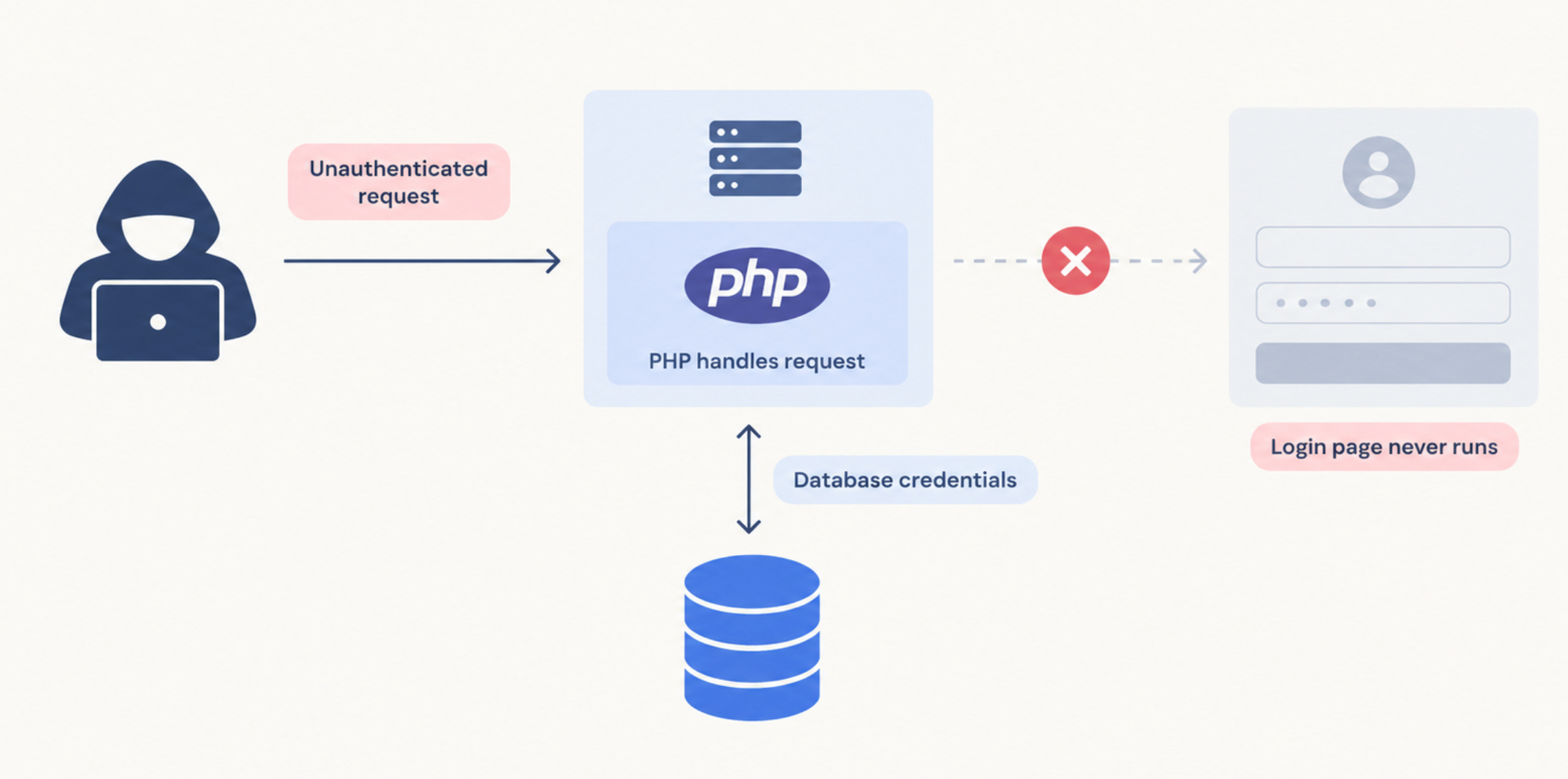
And all of this happens while PHP is still handling the raw request -- before the website’s own code runs, and before anyone is asked to log in.
For comparison, Python. Airflow’s webserver and Superset are Python services. A Python worker also serves many requests in a row, but it never promises a clean room in the first place. It frees each piece of memory only when nothing refers to it anymore. And when it runs out of memory, it raises an ordinary error instead of making an emergency stop. A leftover in Python means a leak or the wrong data showing up, not corrupted memory. That doesn’t make Python services safe, as the next sections show. It just means they fail differently. Go and other long-running servers sit even further from PHP, with one process and one heap for every request; this walkthrough is a good look at that shift for anyone coming from PHP.
“Unauthenticated” means your login page never ran
The most important word in the NCSC alert isn’t “critical” or “remote code execution.” It’s “unauthenticated.” The attacker doesn’t need an account, a password or a session. The bug lives in how PHP handles the request itself, below the application. Your SSO integration, your role-based access, your carefully reviewed permissions model -- none of it gets a chance to say no.
Once someone runs code on the box, the playbook is boring and effective:
Read the config file. Every app has to talk to its database, so the DB host, user and password usually sit right there.
Drop a webshell -- a small file in the web root that lets them come back later, after you’ve patched. This is why NCSC says to check for compromise before patching. A patch closes the door; it doesn’t evict anyone already inside.
Use the network position. The web server can reach the database, internal services, and in the cloud sometimes the metadata endpoint that hands out credentials for the machine’s role.
That’s the part that matters to a data team. The web app is rarely the target. It’s the doorway. The prize is whatever database sits behind it.
And here’s the uncomfortable generalisation: every service you expose to the internet is trusting that its whole request-handling stack -- runtime, web server, framework, auth library -- has no bug like this one. Not today, not next year. The application’s login page only protects you from attackers who play by the application’s rules.
It’s not just PHP: Airflow and Superset have been here too
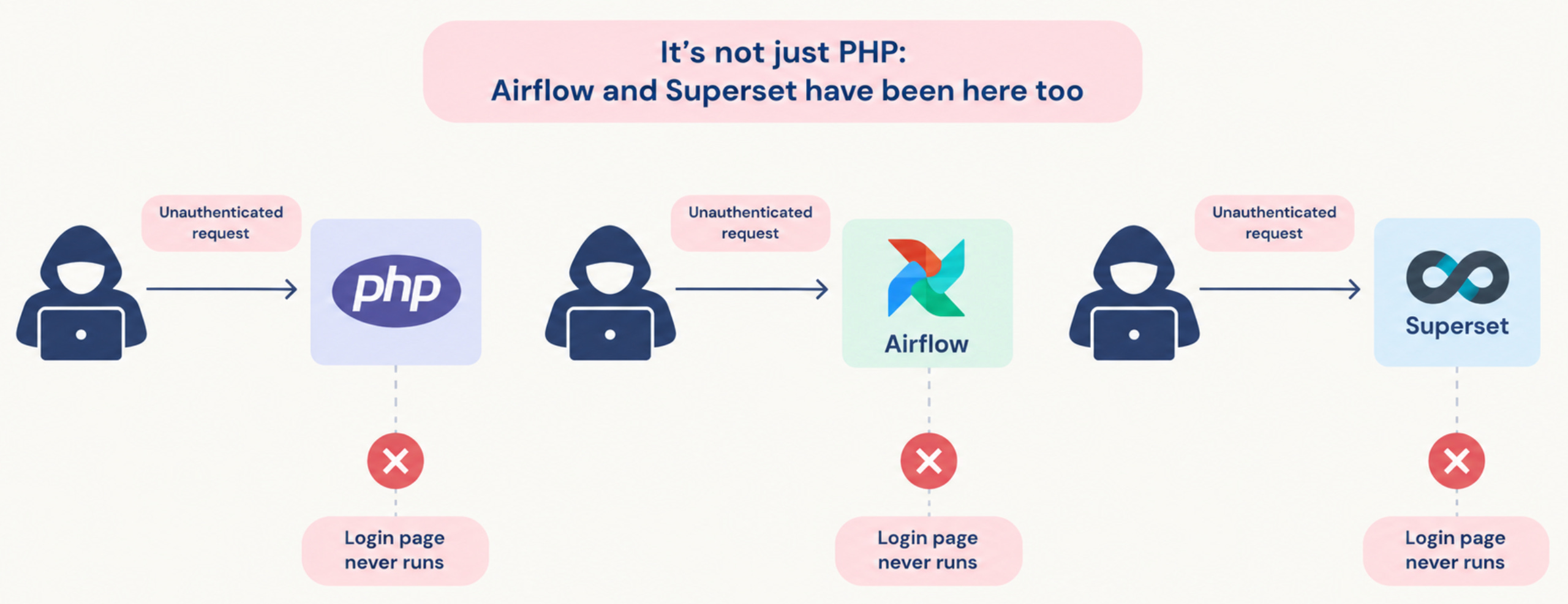
It would be easy to read this as “PHP problem, not ours.” The two tools at the center of most of our deployments have their own history with exactly this class of failure -- getting past the login page without credentials.
Superset, CVE-2023-27524. Superset signs session cookies with a SECRET_KEY. Versions up to 2.0.1 shipped with a default value, and anyone who knew that value could forge a session cookie and walk in as a legitimate user (The Hacker News). Horizon3.ai searched the internet for exposed Superset instances in February 2023 and found 3,176. Of those, 2,124 -- about two thirds -- were still using one of the known default keys (Security Affairs). Two thirds of the publicly reachable Superset instances on the internet, open to anyone who read the docs.
Airflow, CVE-2020-17526. Same shape, three years earlier. The Airflow webserver used a default secret_key for its Flask sessions, so a session from one Airflow instance could be accepted by another instance running the same default (SentinelOne). Fixed in 1.10.14.
Neither of these is a memory corruption bug like the PHP one. They’re configuration defaults. That’s the point: the ways past a login page are varied, and new ones keep showing up. Some are in the runtime, some in the framework, some in a docker-compose.yml someone copied from a quickstart.
And Airflow and Superset aren’t just any web apps. Airflow holds connections -- database passwords, cloud credentials, API keys for every source system it pulls from. Superset holds database connections to the warehouse and, by design, lets its users run SQL. Get past either login page and you’re not one step from the data. You’re standing in it.
Why school data raises the stakes
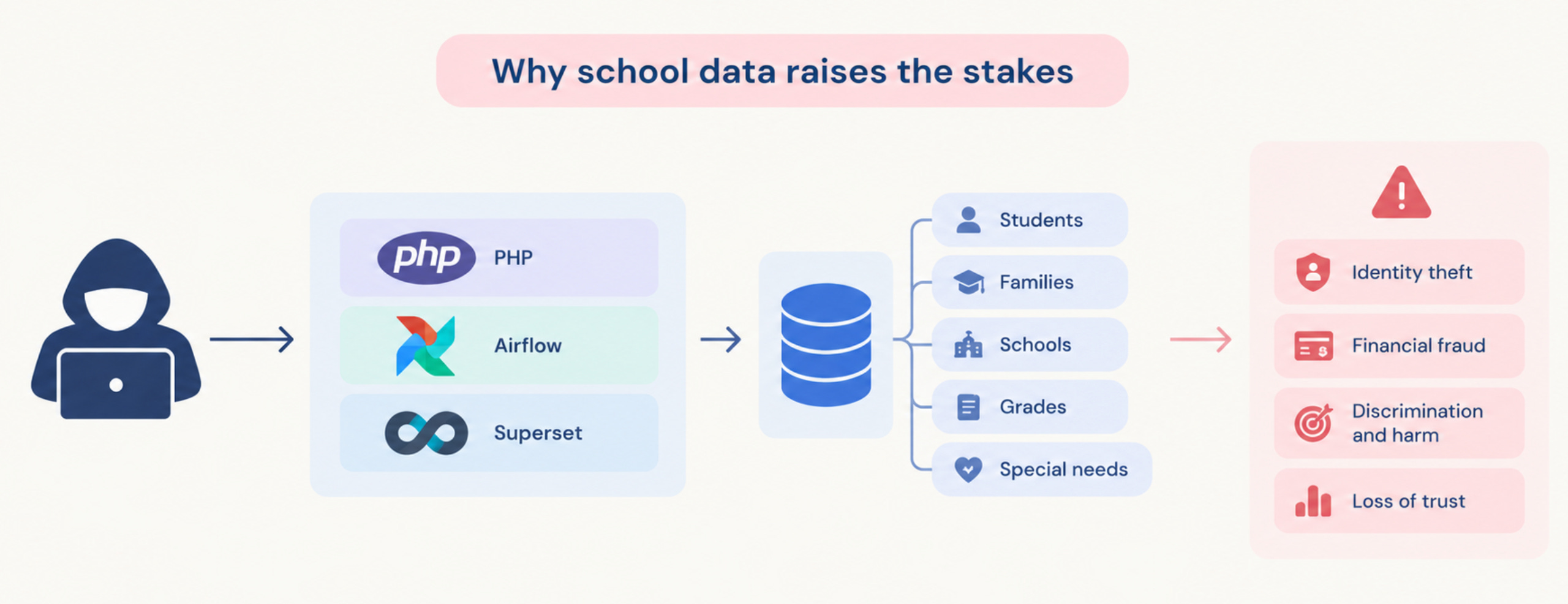
The Ponder DWE is data infrastructure for K-12 schools and networks that we’re still actively building. It’s shaped by our partnership with Uncommon Schools, and we’re now extending it to multi-academy trusts in the UK. The warehouse behind it holds the kind of data you least want to leak: student names, birth dates, addresses, enrollment, attendance, grades, guardian contacts.
The sector already knows what that looks like at scale. In December 2024, an attacker used a single compromised credential to get into PowerSchool’s customer support portal, and from there used a data export tool to pull student and teacher records out of the SIS (TechTarget). Court documents later put the number of affected people at about 62 million. Reporting at the time put it at more than 62 million students and 9.5 million teachers across over 6,500 districts (BleepingComputer via NewsNation).
That breach wasn’t a memory corruption exploit. It was the other classic: a valid credential, used against a portal that was reachable and that had export powers. Different mechanism, same lesson. When a service that can read student data in bulk is reachable from anywhere, its security comes down to every credential and every line of code in front of it holding up, forever.
Schools also have less room to absorb a mistake than most companies. Data teams are small, security teams often don’t exist as a separate function, and the people affected are children who never chose to hand their data to anyone. In the US that data falls under FERPA. In the UK, under UK GDPR, with the ICO watching. “We patched it within the week” is not much comfort to a parent if the week was long enough.
Where student data actually lives
A school’s data doesn’t sit in one system. Two kinds matter most for this post, and they face very different people.
The SIS -- the system of record. A Student Information System holds enrollment, demographics, attendance, grades and schedules. UK schools call the same thing a Management Information System, or MIS. At Uncommon Schools it’s PowerSchool, and we’ve written about ingesting it with Trino. The SIS is used by school staff, and the DWE reads from it.
The LMS -- where students actually log in. A Learning Management System holds courses, assignments, quiz results and gradebooks. Moodle is the best-known open-source one: a free learning management system written in PHP and released under the GNU GPL (Wikipedia). It runs on any server that can run PHP and an SQL database (Moodle Docs). Moodle’s own statistics list about 161,000 registered sites with around 412 million users across 242 countries (moodle.org/stats) -- and registration is optional, so the real number is higher.
The LMS is where a school’s systems meet students directly. Students open it from home, from phones, from a library computer, so it has to be reachable from the public internet -- there’s no VPN you can ask a twelve-year-old to install. And because Moodle is free and self-hostable, many schools run their own on their own server. Public, written in PHP, often self-hosted, with the database user and password sitting in config.php next to the code (Moodle Docs): that’s exactly the kind of installation the NCSC alert is about.
The DWE’s job is to bring the SIS, the LMS and the rest together in one warehouse. That’s what makes it useful. It’s also what makes the warehouse the single most valuable target in a school’s whole stack.
DWE adapters: what they are, and why they’re Python
By DWE adapters we mean the services that sit between the warehouse and the people who use it -- the parts of the DWE someone actually logs into. Two carry most of the weight:
Airflow runs the pipelines. It pulls from the SIS and the LMS on a schedule, runs dbt, and holds the connections -- the credentials -- to every source system it touches.
Superset is where analysts, school leaders and network staff look at the data: dashboards and SQL exploration, with connections straight into the warehouse.
Around them sit our own custom servers, built for and around the DWE: MCP servers that let AI assistants read Airflow and dbt metadata, the Airflow chat plugin, dbt-kg for lineage questions in chat, superset-promote-dashboard for moving dashboards between environments, and many more. Those deserve a post of their own, and we’ll probably write one.
Every one of them is a Python server. That’s a deliberate choice, for four reasons:
The tools we extend are Python. Airflow and Superset are themselves Python applications. Extending them means writing Python: Airflow plugins are Python modules, and superset-promote-dashboard hooks into Superset’s Flask app through
FLASK_APP_MUTATOR, with no changes to Superset’s own source.The data and AI tooling is Python-first. dbt, LangChain, the MCP SDKs, the graph and vector clients we use -- all of it is native in Python. A custom server in another language would spend half its code translating.
One runtime to patch. Every adapter and every custom server shares one language, one dependency ecosystem and one way of scanning and updating it. When an advisory lands, there’s one place to look.
Python fails differently. As the comparison above showed, a leftover in a Python worker means a leak or the wrong data, not corrupted memory. That’s not immunity -- Python has its own CVEs and its fast parts are often C -- but it means a mistake in our own code is far less likely to turn into someone else’s code running on our servers.
Just as important is who they face. The DWE adapters are staff-facing. No student ever needs to log into Airflow or Superset, so the people who need them are a known, small group with school accounts. That’s what makes it practical to keep them off the public internet entirely.
The student-facing surface is the LMS, and it has to stay public. So the DWE design treats Moodle as an untrusted neighbour: Airflow pulls data from it with read-only credentials, Moodle never gets a network route into the DWE, and nothing in the DWE depends on the Moodle server being uncompromised. If a school’s Moodle gets hit by a bug like this week’s, the damage should stop at Moodle.
How we’re building the Ponder DWE: private by default
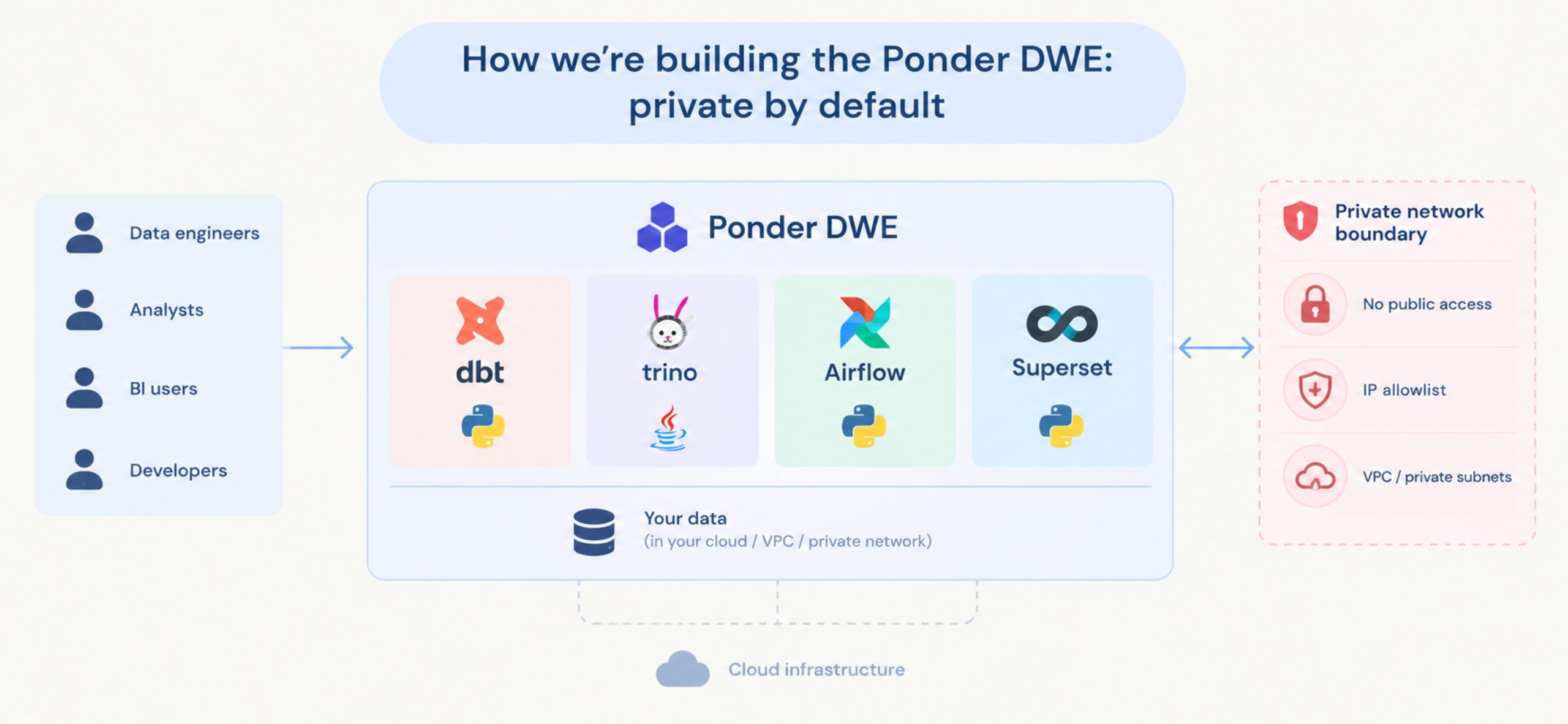
The principle is simple to say: nothing that can read student data should be reachable from the open internet. Not the warehouse, not Trino, not the Airflow UI, not Superset, not dbt docs. The DWE is a work in progress, so read what follows as the design principles we’re building toward and rolling out step by step, not a description of a finished product. In practice they come down to a handful of decisions.
1. The network is the first lock, the login page is the second. In the DWE design, Airflow, Superset and Trino sit on a private network. To reach them, a person first proves who they are to the network -- VPN or an identity-aware proxy tied to the school’s SSO -- and only then sees the app’s own login page. An unauthenticated bug like this week’s PHP one, or a forged session cookie like Superset’s, is only exploitable by someone who’s already inside. That shrinks the attacker pool from “the whole internet, scanning automatically” to “people we already know.”
2. Development happens inside the boundary, not on laptops. Our engineers and analysts work in Coder workspaces -- isolated, Terraform-defined dev environments we’ve written about before. The workspace runs next to the services it needs, and Coder proxies the Airflow UI or VS Code out to the browser. Nobody needs a production database port opened to their home Wi-Fi to do their job.
3. Credentials live in one place. Model API keys go through a self-hosted LiteLLM gateway, so individual developers never hold a raw provider key and usage is tracked per person. The same logic applies everywhere: the fewer places a secret is copied to, the fewer places it can leak from.
4. Machines get the narrowest access that works. When we connected AI tooling to dbt and Airflow through an MCP gateway, the service accounts behind it were read-only and limited to metadata -- no job execution, no queries against real student data. An AI assistant that can explain lineage doesn’t need to be able to export the students table.
5. If something truly has to be public, it’s a separate thing. Occasionally a dashboard or a data product needs to reach people outside the network. That gets its own narrow service, with its own aggregated, de-identified data and no path back to the warehouse -- never “let’s just open Superset for this one.”
None of this is exotic. It’s mostly the decision to treat “is this reachable from the internet?” as a design question, asked on day one, rather than something you discover from a Shodan search.
How we actually set up the VPN side of this -- on AWS and on Azure, for different clients -- deserves its own write-up. We’ll cover it in a future post.
The edges
Private is not a substitute for patching. It buys time and shrinks the blast radius; it doesn’t make a vulnerable service safe. A compromised laptop on the VPN, a phished SSO session, a malicious insider -- all of them are “inside.” The PowerSchool breach started with a valid credential, and a VPN would not have stopped a valid credential either. So the private boundary sits alongside patching, least privilege and monitoring, not instead of them.
It also has a real cost. Private services are a bit less convenient: one more login, one more thing for a new analyst to set up, one more question when a teacher asks “can I just get a link to this dashboard?” We think that’s the right trade for student data. It’s still a trade, and we’d rather say so than pretend it’s free.
And on the PHP specifics: we’re data engineers, not security researchers. The NCSC says remote code execution is possible “under certain conditions” and doesn’t spell out how reachable those conditions are in practice, and the alert doesn’t claim active exploitation. The architecture walkthrough above explains how PHP’s design makes this class of bug possible, matched to the advisory’s descriptions -- it’s not a reverse-engineered root cause.
If you do run PHP anywhere -- and “we don’t write PHP” is not the same as “we don’t run PHP” -- follow NCSC’s list: find every PHP install, including inside vendor appliances, update, apply the temporary mitigations if you can’t, and check for backdoors before you patch. NCSC-NL, the Dutch counterpart, maintains a list of products with a PHP dependency that may be affected. A school’s Moodle, the website’s WordPress, a phpMyAdmin someone set up “temporarily” -- those count.
The short version
Every service on the open internet is betting that nothing below its login page will ever break. This week, for PHP, it did. For Superset and Airflow, it already has. For a platform that will hold children’s records, we’d rather not take that bet at all. That’s why we’re making it a design decision now, while the DWE is still being built, instead of retrofitting it later.
A login page is a lock on the door. A private network decides who gets to stand in front of the door in the first place.
Related posts: PowerSchool to Lakehouse: Student Data at Uncommon Schools · Coder + Airflow: Managing Local Development Like a Pro